

 Modbadger
FO2 Nick Changer - программа для создания длинного ника в игре FlatOut 2.


Локализации:

Локализации:
Мод локализован на 1 язык
(Вам не нужно ничего скачивать дополнительно, чтобы играть на этих языках)
FO2 Nick Changer дает возможность написать не только длинный ник, но и использовать нестандартные символы, а также написать ник в две строки.
Использование программы
1. Запустите программу, она доступна только на русском языке.
2. Введите адрес, где находится ваша игра ("Обзор" откроет проводник, чтобы вы могли найти игру, а "Закрыть" - закроет окно). После ввода адреса нажмите "ОК".

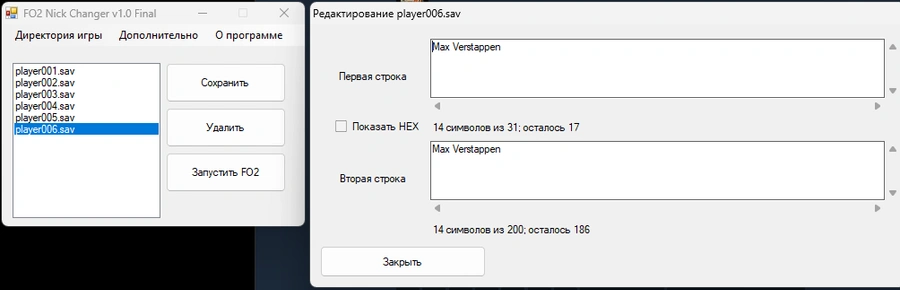
3. Дальше вы увидите список ваших существующих профилей, выберите любой профиль, которому хотите изменить никнейм.
Первое окошко, это ввод символов, которые будут в первой строке, максимум можно ввести 31 символ. Второе окошко, это второй ряд символов, здесь вы можете ввести максимум 200 символов.
После завершения редактирования нажмите кнопку "Сохранить". Кнопка "Удалить" удалит выбранный профиль, а "Запустить FO2" - запустит игру.
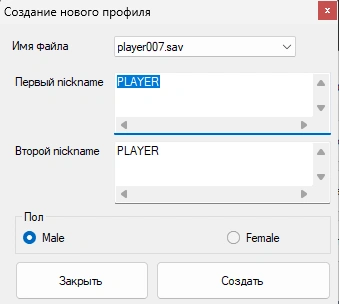
4. Если вы хотите создать новый профиль прямо в этой программе, нажмите на "Дополнительно" и затем "Создать профиль". Потом введите любой никнейм и выберите пол.
Как сделать ник цветным
Также возможно вы не знали, но вы можете даже без этой программы менять цвет своего ника в FlatOut 2, просто перед ним нужно написать соответствующий код цвета, например #36 Juan
#7 — Красный
#10 — Белый
#31 — Оранжевый
#35 — Светло-зеленый
#36 — Желтый
#44 — Темно-серый
#45 — Синий
#46 — Зеленый
#68 — Светло-серый
#69 — Розовый
#70 — Серый
#71 — Светло-голубой
#72 — Фиолетовый
#75 — Золотой
#77 — Черный
#999 — Автоматическое изменение цветов
Источники