Modbadger


Instrukcja instalacji silnika Fheroes2: Resurrection
Jeśli pobrałeś archiwum .zip
Rozpakuj archiwum do dowolnego folderu na swoim komputerze
Jeśli masz legalnie zakupioną kopię oryginalnej gry, uruchom skrypt przez extract_homm2_resources.bat, aby wykonać automatyczne wyszukiwanie istniejącej instalacji oryginalnej gry i wyodrębnić wszystkie niezbędne pliki zasobów do folderu fheroes. Jeśli skrypt nie będzie w stanie znaleźć istniejącej instalacji, zostaniesz poproszony o ręczne wprowadzenie lokalizacji oryginalnej gry
Jako alternatywę dla poprzedniego kroku, możesz ręcznie skopiować podkatalogi ANIM, DATA, MAPS i MUSIC z katalogu oryginalnej gry do folderu fheroes2.
Jeśli nie masz legalnie zakupionej kopii oryginalnej gry, możesz pobrać i zainstalować wersję demo oryginalnej gry, uruchamiając skrypt download_demo_version.bat
Uruchom fheroes2.exe
Graj!
Jeśli pobrałeś instalator
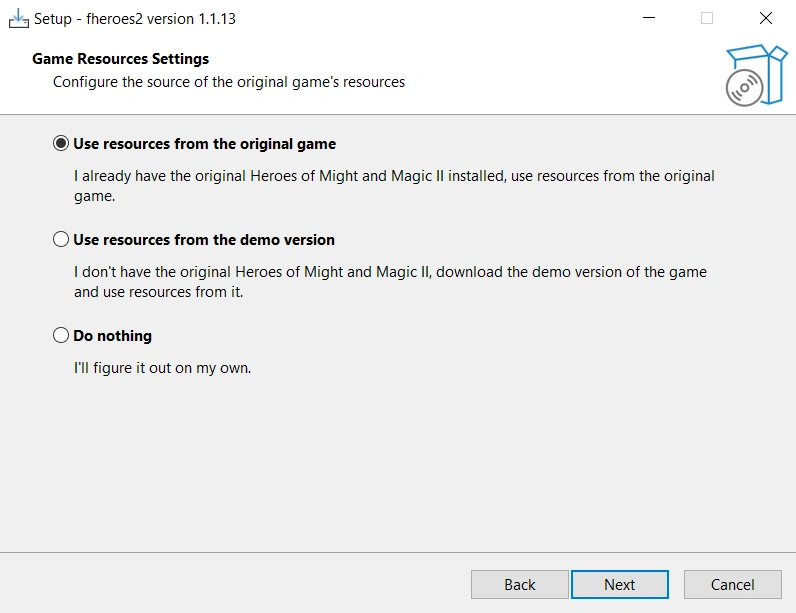
Uruchom instalator, wybierz folder, w którym zainstalować fheroes2, a na końcu konfiguracji procesu instalacji wybierz jedną z trzech opcji:
"Use resources from the original game" - aby automatycznie wyodrębnić zasoby z istniejącej instalacji oryginalnej gry
"Use resources from the demo version" - jeśli nie masz gry, aby pobrać i zainstalować wersję demo oryginalnej gry
"Do nothing" - po zakończeniu instalacji, ręcznie skopiuj podkatalogi ANIM, DATA, MAPS i MUSIC z katalogu oryginalnej gry do folderu fheroes2. Lub uruchom extract_homm2_resources.bat, aby wykonać działanie "a)" i download_demo_version.bat - dla "b)"
Uruchom fheroes2.exe
Graj!