
Alice Dreamland
Mod for American McGee's Alice (2000) | Category: Custom Campaign
 Modbadger
Mod for American McGee's Alice (2000) | Category: Custom Campaign
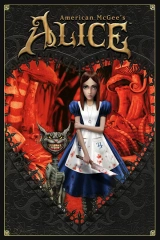
Alice Dreamland is a major story mod for American McGee's Alice with many new levels - from a bright candy kingdom to gloomy catacombs. It adds new enemies, the Cashier Frog character, bonuses, difficulty, voice acting, easter eggs and references.


Localizations:


Localizations:
The mod combines platforming and combat elements, where arena structure and level design directly affect character survival, and the surrealism of the environment has meaning — obstacles and strange spaces reflect Alice's psychological state. New enemies appear, additional characters including Cashier Frog, unique bonuses and increased difficulty level.
Some levels of the modification create a feeling of a living world: mysterious ruins, rotating platforms and original puzzles make the gameplay dynamic and diverse. The mod features voice acting and story cutscenes, as well as numerous easter eggs and references to the original game and its sequel Madness Returns.
Alice Dreamland offers players complete immersion in a dark, fantastic world, preserving the spirit of the original while expanding it with new locations, mechanics and creative ideas. The mod is simultaneously partially in English and Russian - menus and subtitles are in English, while voice acting is in Russian.
Compatibility issues with other mods:
Cannot install the Alice and her dresses mod
Full compatibility with the American McGee's Alice HD 2020 mod is not guaranteed.
Other mods are compatible
How to install a mod Alice Dreamland
Extract the archive contents to the game's root directory
Go to the Dreamland\RESOLUTIONS folder and copy one of the autoexec.cfg files corresponding to your screen resolution to the Dreamland folder
Run Dreamland.bat
Play!