Fheroes2: Resurrection
Engine for Heroes of Might and Magic II (1996) | Category: Recreated engines
 Modbadger
Engine for Heroes of Might and Magic II (1996) | Category: Recreated engines
Fheroes2: Resurrection is a cross-platform engine for Heroes of Might and Magic II written from scratch. It supports modern resolutions, improved AI, localizations in various languages, a map editor, an enhanced interface, and fixes numerous bugs, allowing you to enjoy the game on modern devices.


Localizations:


Localizations:
Fheroes2: Resurrection is an open source project that completely recreates the Heroes of Might and Magic II engine from scratch in C++. The engine allows running the game on modern platforms — Windows, Mac, Linux, Nintendo Switch, PS Vita, and Android — with support for high and widescreen resolutions, as well as an optimized interface.
The project has been actively developed for over 10 years, and recently, under the leadership of a new development team, significant progress has been observed: almost all code has been reworked, new rendering has been introduced, thousands of bugs have been fixed, and optimizations have been added to improve performance. The visual component of the interface has been improved: all special event windows now have titles, shortcomings in the dark interface have been corrected, and visual elements of spells and game mechanics have been reworked.
The engine supports multi-platform translations of game texts into more than 20 languages, including the ability to change languages for text on button sprites. For touch devices, a stylized virtual keyboard and swipe controls have been added, and for PC — support for hotkeys and new settings menus.
Features
Running on modern resolutions (including widescreen)
New AI built from scratch and evolving to provide worthy opposition to the player
Quick battle mode with replay capability
Convenient stack splitting and army management
Redesigned battle animations and effects
Additionally, the engine has a built-in map editor that allows creating and testing custom maps with improved object customization, elimination of graphical flaws, and the possibility of future additions.
Fheroes2 is a complete rework of the original engine. All changes are optional and aimed at improving convenience, visual quality, and expanding game capabilities while preserving the spirit and strategic depth of Heroes of Might and Magic II. The project continues to actively develop, with prospects of adding new mechanics, objects, heroes and creatures, as well as further optimization for modern devices and controls.
How to install an engine Fheroes2: Resurrection
If you downloaded the .zip archive
Extract the archive to any folder on your PC
If you have a legally purchased copy of the original game, run the script via extract_homm2_resources.bat to perform an automatic search for the existing installation of the original game and extract all necessary resource files to the fheroes folder. If the script cannot find an existing installation, you will be prompted to enter the location of the original game manually
As an alternative to the previous step, you can manually copy the ANIM, DATA, MAPS, and MUSIC subdirectories from the original game directory to the fheroes2 folder.
If you don't have a legally purchased copy of the original game, you can download and install the demo version of the original game by running the download_demo_version.bat script
Run fheroes2.exe
Play!
If you downloaded the installer
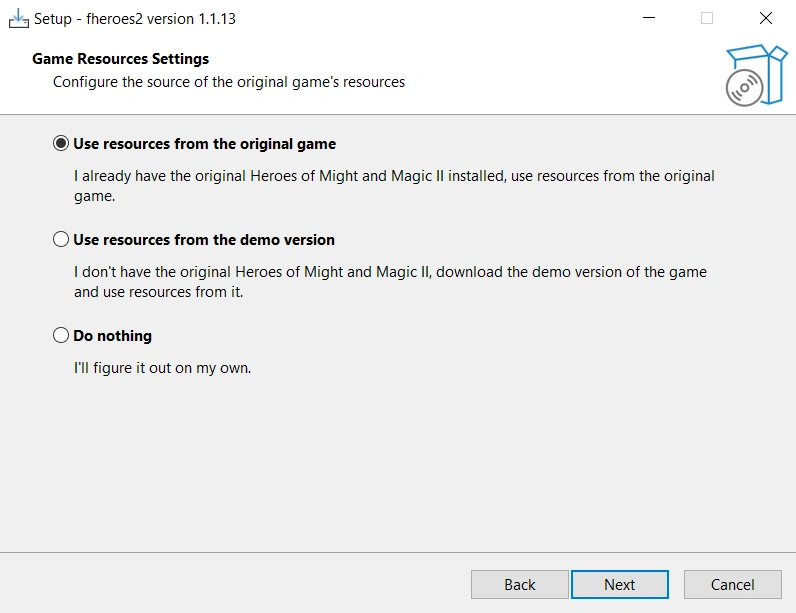
Run the installer, select the folder where to install fheroes2, and at the end of the installation process setup, choose one of three options:
"Use resources from the original game" - to automatically extract resources from an existing installation of the original game
"Use resources from the demo version" - if you don't have the game, to download and install the demo version of the original game
"Do nothing" - after installation is complete, manually copy the ANIM, DATA, MAPS, and MUSIC subdirectories from the original game directory to the fheroes2 folder. Or run extract_homm2_resources.bat to perform action "a)" and download_demo_version.bat - for "b)"
Run fheroes2.exe
Play!