

 Modbadger
BetterChat to mod, który znacząco poprawia funkcjonalność czatu w FlatOut 2. Automatycznie tłumaczy wiadomości między 5 językami, a także umożliwia pisanie na czacie podczas wyścigu, derbów lub zawodów kaskaderskich.


Lokalizacje:


Lokalizacje:
Mod został zlokalizowany na 5 języków
(Nie musisz niczego dodatkowo pobierać, aby grać w tych językach)
Zawsze chciałeś zrozumieć, co o tobie piszą na czacie, ale nie rozumiałeś języka? Dzięki modowi BetterChat komunikacja w FlatOut 2 nigdy wcześniej nie była tak bezproblemowa, pozbawiona bariery językowej! Napisz w odpowiedzi, co myślisz o graczach takich jak KolinSEX, w swoim języku — a on zrozumie, co powiedziałeś, w swoim!
Funkcje
W pełni funkcjonalny czat w formacie dll/asi, zarówno w nowej wersji gry (po aktualizacji Zoom Platform), jak i w starej oryginalnej wersji od Bugbear.
Możliwość tłumaczenia wiadomości pomiędzy językami angielskim, rosyjskim, hiszpańskim, niemieckim i tureckim
Możliwość kopiowania i wklejania wiadomości
Możliwość komunikacji podczas wyścigów i w różnych menu, nie tylko w lobby
Możliwość zmiany pozycji, rozmiaru i skrótów klawiszowych czatu w dołączonym pliku ini
Dołączony plik multiplayerlobby.bed (BetterChat.bfs) do usunięcia oryginalnego czatu z lobby
Kolor nazw graczy zależy od koloru twojej strzałki
Kompatybilność z oryginalnym czatem. Wszystko, co napiszesz w nowym czacie, zobaczą gracze w starym bez zainstalowanego moda i odwrotnie
Obsługa cyrylicy. Nawet jeśli napiszesz w dowolnym języku używającym cyrylicy, gracze bez zainstalowanego czatu zobaczą to bez problemu (w nowszych wersjach gry od Zoom Platform, z powodu błędu cyrylica nie jest obsługiwana w czacie)
Przewijanie czatu za pomocą Page Up i Page Down
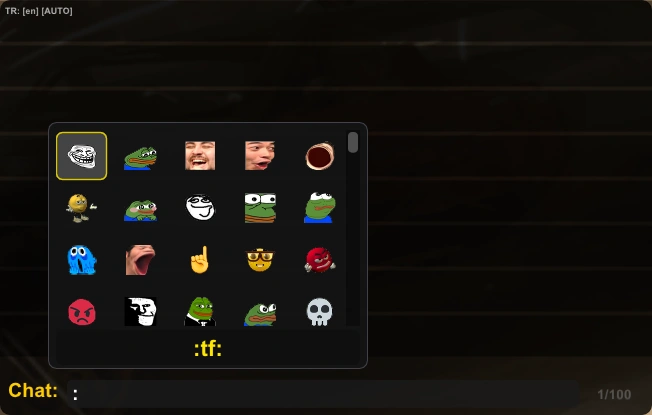
Wsparcie Emoji (statycznych i animowanych) — łącznie 98 emoji, z czego 17 jest animowanych
Szabłony wiadomości. (10 szablony, do których możesz przypisać skróty klawiatury i niestandardowy tekst dla szybkiego wysyłania wiadomości, na przykład podczas wyścigów. Możesz je edytować w pliku .ini)
Możliwość włączenia ustawienia w pliku .ini o nazwie BCUserStar, które pozwala widzieć gwiazdkę obok nicku graczy, którzy również używają BetterChat.
Sterowanie
Przypisania klawiszy: Domyślnie czat otwiera się klawiszem Y, ale można to zmienić w pliku .ini
Użyj symbolu :, aby otworzyć okno wyboru Emoji
Jeśli nie lubisz widzieć wiadomości podczas wyścigu, naciśnij F7, aby je ukryć. Jednak nadal będziesz je widział, jeśli otworzysz czat.
Użyj klawiszi F8, aby ukryć wiadomości innych graczy, gdy czat jest zamknięty (przydatne podczas wyścigu)
Przełączaj się między tłumaczeniami za pomocą F9. Dostępne są tłumaczenia na język angielski, rosyjski, hiszpański, niemiecki i turecki
Wybierz, czy tłumaczyć tekst pisany przez ciebie do innych graczy za pomocą F10
Wybierz, czy tłumaczyć tekst innych graczy dla ciebie za pomocą F11
Użyj klawisza F12, aby włączyć/wyłączyć automatyczne wykrywanie języka tłumaczeń innych użytkowników
Odpowiedzi na najczęściej zadawane pytania
Jeśli zainstaluję BetterChat, czy będę mógł komunikować się z tymi, którzy nie zainstalowali tego moda?
W tym tkwi cała istota moda. Będziesz mógł komunikować się nawet z tymi, którzy nie mają tego moda. Zarówno ty, jak i oni będziecie mogli widzieć swoje wiadomości. Wiadomości będą również tłumaczone. Jedyne jest to, że gracze bez moda nie będą mogli widzieć twoich wiadomości podczas wyścigu. Ponadto ten mod naprawia błąd gry, gdy w czacie nie wyświetla się czcionka cyrylicy. Napisana przez ciebie wiadomość używająca cyrylicy również będzie normalnie widoczna dla tych, którzy nie mają tego moda.
Czy mod działa tylko na nowej wersji gry?
Mod działa na wszystkich oficjalnych wersjach gry, w tym na starej wydanej przez Bugbear w 2006 roku.
Czy są jakieś ukryte problemy?
Tylko jakość tłumaczenia. Tłumaczenie nie jest idealne, ale akceptowalne. Silnik tłumaczenia: Google Translate, jednak możesz go ulepszyć, przechodząc na Azure. Aby to zrobić, uruchom grę z modem — w folderze z grą pojawi się plik tekstowy BetterChat.ini. Otwórz go i w linii "UseAzure=0" zmień wartość na 1. Następnie utwórz swój klucz API Azure i wklej go w linię "AzureKey=", a następnie wpisz swój region w linii "AzureRegion=". Region musi być napisany małymi literami BEZ spacji, na przykład: westeurope, eastus, ukwest, southeastasia, australiaeast. Jeśli Twój region jest globalny, pozostaw "AzureRegion=" puste lub wpisz global. / Jeśli to zbyt skomplikowane — po prostu zostań przy Google Translate.
Czy mogę zostać zbanowany w trybie multiplayer za używanie tego moda?
Nie. Ten mod nie narusza żadnych zasad fair play. Ponadto wydaje się, że takie mechanizmy banowania po prostu nie istnieją po stronie deweloperów.
Mój antywirus wykrył ten mod jako wirusa — dlaczego?
BetterChat zdecydowanie nie jest wirusem. To fałszywe wykrycie spowodowane aktywnością sieciową moda: łączy się on z API Google Translate i przechwytuje pakiety sieciowe w grze, aby czat mógł działać. Mod jest całkowicie bezpieczny — dziesiątki graczy, którzy go używają, nigdy nie zgłaszały żadnych problemów z bezpieczeństwem po instalacji. Autor, który go stworzył, również nie jest nowicjuszem: to weteran gry, dobrze znany wielu graczom FlatOut 2 pod nickiem Ember.
Postąpiłem zgodnie z instrukcją, ale mod nie działa
Najprawdopodobniej Twój antywirus zablokował moda z powodu fałszywego wykrycia. Dodanie go do białej listy powinno rozwiązać problem.
Autor moda, Ember, życzy ci dobrej zabawy, więc nie powinieneś go zawieść! <3
P.S. Jeśli będziesz miał szczęście zobaczyć [PRO_RACE] Ember w jednym z lobby w grze, możesz mu podziękować — włożył wiele pracy w ten mod :)
Jak zainstalować mod BetterChat
Przenieś pliki BetterChat.bfs, BetterChat.asi i winmm.dll do katalogu głównego gry.
Otwórz w edytorze tekstu plik filesystem (jeśli masz nową wersję gry) lub path (dla starej wersji gry sprzed aktualizacji Zoom Platform latem 2024 roku). Wpisz na końcu listy w nowej linii BetterChat.bfs. Następnie zapisz plik.
Graj!
Po uruchomieniu gry pojawi się plik tekstowy BetterChat.ini, w którym można skonfigurować moda — na przykład domyślnie włączyć tłumaczenie oraz możliwość wysyłania szybkich wiadomości, w tym podczas wyścigu, używając Windows Virtual Key Codes do przypisywania klawiszy.