
Unofficial Crusader Patch (UCP)
Mod for Stronghold: Crusader (2002) | Category: Patches
Author: UCP community | Curator:  Modbadger
Mod for Stronghold: Crusader (2002) | Category: Patches
Author: UCP community | Curator: Modbadger
An unofficial update for Stronghold: Crusader created by a community of enthusiasts. It aims to fix bugs, improve AI, balance units, and expand modding capabilities.


Localizations:


Localizations:
The mod is localized into 5 languages
(You don’t need to download anything extra to play in these languages)
Key Features of Unofficial Crusader Patch (UCP):
Bug Fixes: Resolves issues accumulated since the game's release, including problems with units, economy, and interface.
AI Improvements: More logical bot behavior, enhanced attacks, defense, and construction.
Unit Balancing: Reworked unit stats for fairer and more engaging gameplay.
Modding Support: Convenient system for installing custom AIVs (AI castles), AICs (AI characteristics), starting resources, and troops.
Flexible Configuration: Ability to enable or disable individual features via a graphical interface.
Multiplayer Compatibility: Works in multiplayer if all players use the same settings.
How to install a mod Unofficial Crusader Patch (UCP)
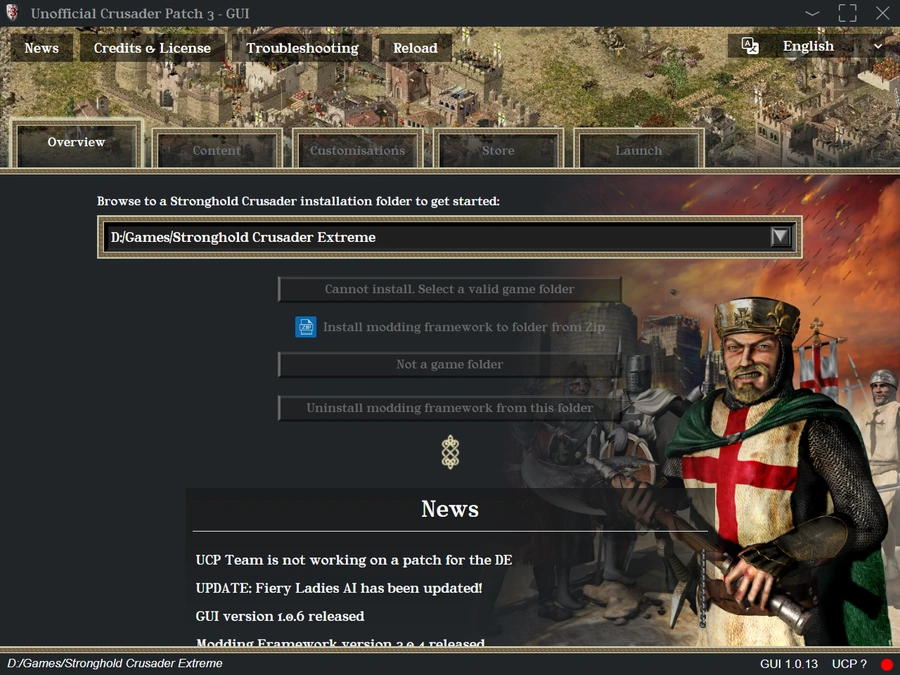
Installation is done in two parts, first we install the GUI, then from the GUI, we install the new Unofficial Crusader Patch modding framework.
Download the latest UCP frontend which functions as an installation manager and mod marketplace.
Install the UCP (the frontend) to the default location and run it. The UCP3-GUI is known to work on Windows 10 and higher. For other windows versions it is important to install the webview2 runtime with the evergreen installer.
The GUI features several tabs. The Overview tab is the one we will use first. Click the browse field and select the folder on which your installation of Stronghold Crusader is installed. If you got the game on Steam, you can use the Steam app to find your installation.
If you installation is in Program Files (x86), it might be that your windows user doesnt have sufficient rights to place and modify files in the game directory. A solution is to copy the game folder to your Windows User folder. After copying, make sure to select the new folder in the GUI.
In the Overview tab click the Install button which will download the latest UCP software (the "framework"), and it will install itself to the configured game directory. The GUI may report that the ucp2 is still installed which you need to uninstall first. Or reinstall the game. In case you have the game on steam you can use "verify integrity of game files" to uninstall ucp2.
When installation finishes, the framework is automatically active by default. In the Content tab there is a list of activated extensions and in the Launch tab there is the option to Launch the game. Lets launch the game to see if it works.
If the game does not launch, you can consult the troubleshooting menu in the GUI.
Visit the Store tab to install extra content. In the Content tab, activate content one by one. Higher listed content in the active extensions list can override lower listed ones if they configure the same option. Click on listed extensions to see what they do and/or provide.
Go to the Launch tab to launch the game, use Steam to launch the game, or run the game manually via the .exe
Have fun!