
Technology Revolution
Mod for Command & Conquer: Yuri's Revenge (2001) | Category: Total Conversion
Author: Technology Revolution Developer | Curator:  Modbadger
Mod for Command & Conquer: Yuri's Revenge (2001) | Category: Total Conversion
Author: Technology Revolution Developer | Curator: Modbadger
Technology Revolution is a mod for Command & Conquer: Yuri's Revenge that focuses on enhancing graphics to improve immersion. It also reworks the existing factions and introduces a new storyline involving Nazis and an alien invasion.


Localizations:

Localizations:
The mod is localized into 1 language
(You don’t need to download anything extra to play in these languages)
The story takes place after the defeat of Yuri, as the Allies and the Soviet Union temporarily unite and the world enters an era of scientific and technological progress. However, Nazi forces that survived World War II have been secretly growing in power and seize the remnants of Yuri's army technology, pursuing world domination and revenge.
An additional threat comes from unstable energy generated by the misuse of the time machine. It spreads beyond Earth and attracts the attention of alien civilizations, who begin an expansion in pursuit of resources and energy. As a result, high-tech wars on Earth and an invasion from outer space unfold simultaneously.
Technology Revolution places a strong emphasis on visual enhancements and large-scale campaigns, though the increased system requirements may reduce performance on low-end PCs.
How to install a mod Technology Revolution
Developers report that some antivirus programs may detect Syring.exe or .dll files as viruses, but they assure this is not the case. Therefore, these files should be added to the whitelist.
Extract the archive.
Move the following files from your RA2 Yuri's Revenge game folder into the mod folder:
gamemd.exe
BINKW32.dll
BLOWFISH.dll
ra2.mix
ra2md.mix
language.mix
langmd.mix
(Optional) Download and install patches if any are available
(Optional) Download and install the music pack, although the game can run without it
Run RunAres.bat
Play!
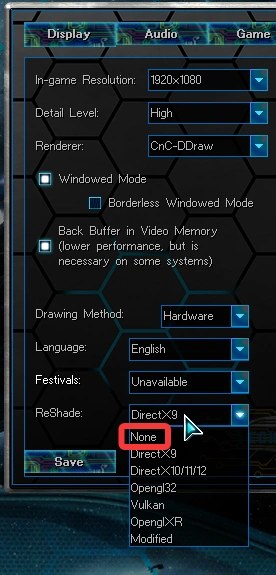
By default, the game has Reshade enabled to improve graphics quality. If your computer has low performance, simply disable it.